What's new.

Every release, what changed, and an honest look at what's next. Baseplate is built in the open.

0.3
October 2026
Latest

Any map, any union.

Open almost any Studio place and see it the way Studio draws it, including unions and meshes that used to show up as grey boxes.

Unions & meshes

  • Roblox's own union shapes are read straight from the place file, so unions look exactly like they do in Studio.
  • Private meshes and unions fall back to their collision shape instead of a box.
  • Group keys load meshes and textures owned by your Roblox groups.
  • Big places finish loading much faster, and downloads retry when the connection drops.
  • A plain-English report in the Output panel explains anything that can't be shown.
0.2
October 2026
0.2.0 – 0.2.9

Looks like Studio. Saves like Studio.

Ten updates that made places look right, round-trip without losing anything, and keep Baseplate up to date on its own.

Lossless round trip

  • Nothing is lost on export. Every property is kept, including ones Baseplate can't edit yet: unions, welds, attributes, terrain data and more.
  • Export to .rbxl (Studio's binary format) or .rbxlx. Object order matches Studio.
  • Checked on every release by an automatic self-test against real places.

Looks

  • Studio-style lighting: sun from ClockTime, shadows, point and spot lights, fog, Atmosphere haze and the place's skybox.
  • Reflections on glass and metal, Reflectance, and indoor areas that aren't lit by the sky.
  • Roblox's own material textures, the 2023 materials, and custom MaterialVariants.

Editor

  • Union, Negate and Separate, 3D Text, on-screen GUI editing and an Insert Object menu.
  • Studio Settings and Game Settings, a right-click menu in the 3D view, and a tidier Explorer and Properties.
  • Sign in with Roblox through Roblox's official sign-in.
  • Installer and auto-updates with stable and beta channels.
0.1.0
October 2026
First build

Hello, Baseplate.

The first build. A full editor you can open your Studio places in, build with, and export back to Studio.

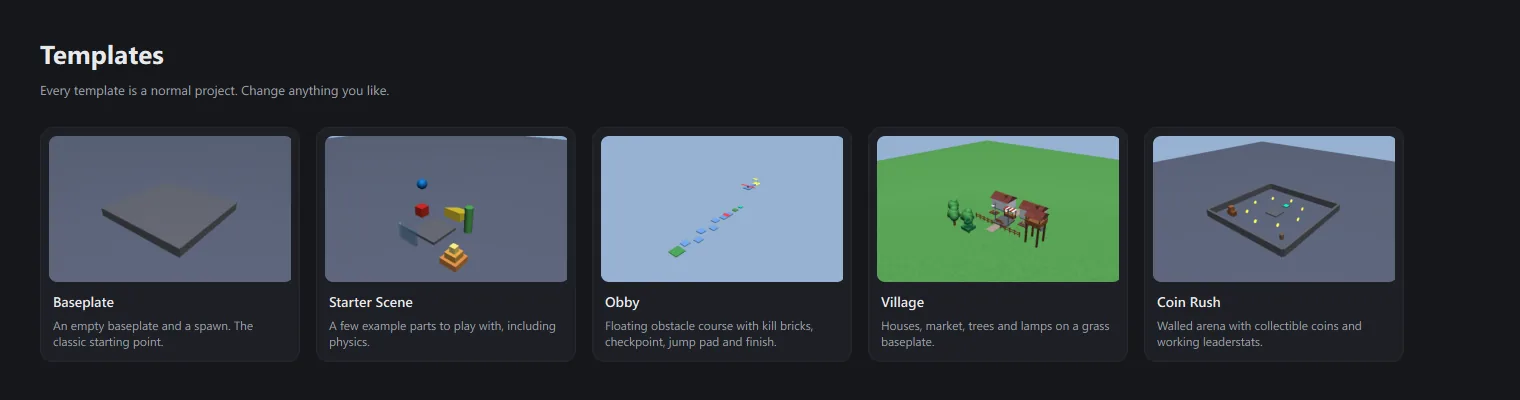
The Templates page showing Baseplate, Starter Scene, Obby, Village and Coin Rush.

Editor

  • Explorer, Viewport and Properties laid out the way Studio users expect.
  • Move, scale and rotate gizmos with visible snapping (studs and degrees).
  • Undo and redo for every edit, plus duplicate, group and ungroup.
  • Studio camera controls: right-drag to look, WASD/QE to fly, F to focus.
  • 35 materials with surface detail, and instanced rendering that keeps huge places smooth.

Roblox Studio files

  • Open .rbxl, .rbxlx, .rbxm and .rbxmx. 400,000-object places open in about four seconds.
  • MeshParts, unions, decals and textures through your own Roblox Open Cloud key, cached after the first load.
  • Export to .rbxlx for Roblox Studio.

Toolbox & templates

  • 29 built-in assets across Nature, Buildings, Props, Obby and Gameplay.
  • Working Luau scripts on kill bricks, jump pads, checkpoints, coins and more.
  • Five templates: Baseplate, Starter Scene, Obby, Village and Coin Rush.

Scripts & Play

  • Luau script editor with syntax highlighting and auto-indent.
  • Play mode for physics tests. Stop restores everything.

Home

  • Home hub with recent projects, templates and an archive that never deletes your files.

Known limitations

  • Luau scripts don't run inside Baseplate yet. Test them in Studio.
  • Properties and classes Baseplate doesn't model yet are dropped on export. Keep your original file. (Fixed in 0.2.9.)
  • No Terrain yet. Not code-signed yet, so SmartScreen will ask once.

Where it's heading.

Priorities can shift based on what creators ask for. Tell us what matters to you in the community.

Done v0.3

  • Editor, Explorer, Properties, transform tools and undo
  • Open Studio places with MeshParts, unions, textures and materials
  • Lossless export back to Studio as .rbxl or .rbxlx
  • Studio-style lighting, sky and atmosphere
  • Sign in with Roblox, installer and auto-update

Later

  • Publish to Roblox through the official Open Cloud API